In many organizations, the mainframe platform is treated as a separate world. It sits alongside the rest of the organization’s IT landscape and is managed with its special processes, staff, and governance. This view is understandable, and often historically grown, but it is an unnecessary misconception in IT.
Your mainframe platform is a component of your IT landscape, just like any other. It has a typical position, responsibilities, and characteristics. Understanding that position is the starting point for making good decisions about it.
Where the mainframe sits
In most organisations, mainframe applications operate in the back-office layer. They handle high transaction volumes, manage large volumes of data, and combine transactional and analytical capabilities. What they typically lack is presentation logic. Modern z/OS applications are headless and comprise integration, business, and data logic.
What surprises many people who think mainframe applications are silos by definition, a layered architecture separating presentation, business logic, and data access, was the mainframe’s best practice long before the web industry reinvented it and called it Model-View-Controller. The principles are the same.
Similar layering principles, applied at the enterprise level, provide a clear separation among front-office, mid-office, and back-office layers. The mainframe applications are mostly in the back-office layer, less frequently in the mid-office. When positioned and built accordingly, they connect cleanly to the rest of your IT landscape through well-defined service interfaces.
What problems arise when you ignore this
Several years ago, I worked with an organization that learned this the hard way. This organization had a premium calculation function tightly built into the presentation layer of its mainframe application, deeply entangled with the front-end processes. This is not a mainframe-specific problem, by the way. I have seen the same pattern in web applications from the early days of the e-business era. The tendency to entangle layers is everywhere.
When the company decided to move to a self-service model, in which customers could calculate their own premiums online, they hit a problem. The business logic they needed to expose was not accessible because it was entangled with the mainframe presentation logic. It was buried inside the front-end, inseparable from it.
The result was that the organization needed to execute a complex and expensive refactoring effort that could have been avoided entirely. The premium calculation logic eventually became a proper service on the mainframe, accessible through a standardised web service interface. The architecture became more flexible and more maintainable. But it took significant time and resources to get there.
The lesson is that the same architectural principles apply everywhere. Modular design, separation of concerns, and service-oriented interfaces apply to the mainframe too.
The practical view and the decision that follows
Understanding where the mainframe fits is the starting point. Now you can better understand its value and reason about it with clear information.
Many organisations make mainframe decisions implicitly. Applications get labelled “legacy” and targeted for replacement without anyone evaluating their actual business value or the real cost of the alternative. That is how organisations end up stuck halfway through a migration, running two systems for the same functionality, with double the cost and double the risk.
The one option that is never viable is inaction. Leaving mainframe applications unattended deepens technical debt and increases risk. Sometimes to the point where decisions are no longer made by choice, but by crisis.
What changes when you understand the mainframe’s position in your IT landscape is that these decisions become tractable. You know what the platform does, what it costs, how it connects, and what it would take to change it. That is not a guarantee of an easy answer. But it is the foundation for an informed one.
I cover these topics in Don’t Be Afraid of the Mainframe: The Missing Introduction for IT Leaders and Professionals. The book is available on Amazon, Barnes & Noble, 24bookprint, and soon on Bol.com, Apple Books, Google Play, and other bookstores. Links in the comments.
Making the transformation decision
When organisations reach the point of making a formal decision about the mainframe, they often approach it as a platform question: should we keep it or replace it?
But the better question is: what do we actually know about this platform, and what would we need to know to make an informed decision?
That means getting clarity on four things. First, the cost. Not just the infrastructure bill, but the total cost of running, maintaining, and developing on the platform, compared to realistic alternatives. Second, the value. What business functions depend on this platform, and what would it genuinely cost to replace them? Third, the technical state. How much debt has accumulated, and what would it take to address it? And fourth, the strategic fit. Does the platform’s position in the IT landscape align with where the organisation is going?
Organisations that keep their mainframe platform and applications well-maintained, up to date, architecturally sound, and free of accumulated debt can host healthy, modern applications that fully exploit what the mainframe does best: transactional throughput, data integrity, security, and reliability at scale. That is a viable and often underestimated path. The alternative decisions, staying too long with a platform that genuinely no longer fits, or leaving one that was working well while underestimating the cost of replacing it, are the ones organisations tend to regret. The platform itself is not the problem. Neglect is. And neglect compounds. The longer maintenance is deferred, the more expensive and disruptive the recovery becomes. At some point, the backlog grows so large that the organisation loses the ability to choose its own path forward.
The starting point is understanding where the mainframe fits in your IT landscape, what it does, and how it connects. From there, the transformation question becomes a business decision rather than a technology prejudice.
These topics — architecture, integration, transformation strategy, and the mainframe-versus-cloud decision — are covered in depth in my book Don’t Be Afraid of the Mainframe: The Missing Introduction for IT Leaders and Professionals, available on Amazon and via seneqa.nl/dbaotm.
When a critical application update requires new infrastructure, such as additional storage, network configuration changes, or middleware adjustments, how long does your mainframe team wait? In many organizations, what takes minutes in cloud environments can stretch to days or weeks on the mainframe. This is not a technology limitation. It’s a process problem that mainframe infrastructure automation can solve.
The mainframe community has made significant strides in adopting DevOps practices for application development. Build automation, continuous integration, and automated testing are becoming standard practices. But application agility means little if infrastructure changes remain bottlenecked by manual processes and ticket queues.
The solution lies in applying the same DevOps principles to infrastructure that we’ve successfully applied to applications. This means standardization, automation, and treating infrastructure definitions as code. While the journey presents unique challenges, particularly around tooling maturity and organizational culture, the mainframe platform is ready for this evolution. This article explores how to bring infrastructure management into the DevOps era.
Standardization and automation of infrastructure
Like the build and deploy processes, all infrastructure provisioning must be automated to enable flexible and instant creation and modification of infrastructure for your applications.
Automation is only possible for standardized setups. Many mainframe environments have evolved over the years. A practice of rigorously standardized infrastructure setups was likely at the root of the setup. However, cleaning up is not generally a forte of IT departments in many organizations. A platform with a history as long as the mainframe often suffers even more from such a lack of cleanliness.
Standardization, legacy removal, and automation must be part of moving an IT organization toward a more agile way of working.
Infrastructure as Code: Principles and Practice
When infrastructure setups are standardized and automation is implemented, the code that automates infrastructure processes must be created in a similar manner to applications-as-code. There is no room anymore to do things manually. Everything should be codified.
Just as CI/CD pipelines are the code bases for the application creation process, infrastructure pipelines are the basis for creating reliable infrastructure code. Definitions of the infrastructure making up the environment must be treated like code and managed in a source code management system, where they can be properly versioned. The code must be tested in a test environment before deployment to production.
In practice, we see that this is not always possible yet. We depend on infrastructure suppliers for hardware, operating systems, and middleware. Not all hardware and middleware software are equipped with sufficient automation capabilities. Instead, these tools depend on human processes. Suppliers should turn their focus from developing sleek user interfaces to providing modern, most likely declarative, interfaces that allow for handling the tools in an infra-as-code process.
A culture change
In many organizations, infrastructure management teams are among the last to adopt agile working methods. They have always been so focused on keeping the show on the road that the risks of continuity disruptions have prevented management from having teams focus on development infrastructure-as-code.
Also, the infrastructure staff are often relatively conservative when it comes to automating their manual tasks. Usually not because they do not want it, but because they are so concerned about disruptions that they would rather get up at 3 a.m. to make a manual change than risk a programming mistake in the automation infra-as-code solution.
When moving towards infrastructure-as-code, the concerns of the infrastructure department management and staff should be taken seriously. Their continuity concerns can often be used to create extra robust infrastructure as a code solution. What I have seen, for example, is that staff do not just worry about creating infra-as-code changes but are most concerned about scenarios in which something could go wrong. Their ideas for rolling back changes have often been eye-opening toward a reliable solution that not only automates happy scenarios but also caters to unhappy scenarios.
However, the concern for robustness is not an excuse for keeping processes as they are. Infrastructure management teams should also recognize that there is less risk in relying on good automation than on individuals executing complex configuration tasks manually.
The evolving tooling landscape
The tools available for the mainframe to support infrastructure provisioning are emerging and improving quickly, yet they are still incoherent. Tools such as z/OSMF, Ansible, Terraform, and Zowe can play a role, but a clear vision-based architecture is missing. Work is ongoing at IBM and other software organizations to extend this lower-level capability and integrate it into cross-platform infrastructure provisioning tools such as Kubernetes and OpenShift. Also, Ansible for z/OS is quickly emerging. There is still a long way to go, but the first steps have been made.
Conclusion
The path to infrastructure-as-code on the mainframe is neither instant nor straightforward, but it’s essential. As application teams accelerate their delivery cycles, infrastructure processes must keep pace. The good news is that the fundamental principles are well established, the initial tooling exists, and early adopters are proving it works.
Success requires three parallel efforts: technical standardization to enable automation, cultural transformation to embrace change safely, and continuous pressure on vendors to provide automation-friendly interfaces. These don’t happen sequentially. They must advance together.
Start by assessing your current state. Inventory your infrastructure processes and identify which are already standardized and repeatable. Then choose one well-understood, frequently performed infrastructure task and automate it end to end, including rollback scenarios. Most importantly, engage your infrastructure team early. Their operational concerns will make your automation more robust, not less.
The mainframe has survived and thrived for decades by evolving. Infrastructure as code is simply the next evolution, ensuring the platform remains competitive in an increasingly agile world.
The mainframe has survived and thrived for decades by evolving. Infrastructure as code is simply the next evolution, ensuring the platform remains competitive in an increasingly agile world.
Getting started: your first IaC step
Inventory your infrastructure processes
Identify one standardized, frequently performed task
Automate it end to end including rollback
Engage your infrastructure team early
Measure before and after: time, errors, incidents
Are you already on this journey? I’d love to hear where your organization stands— leave your thoughts below.
[Explore more mainframe modernization topics in my book Don’t Be Afraid of the Mainframe →](https://execpgm.org/dbaotm-the-book/)
This topic is covered in depth in my book Don’t Be Afraid of the Mainframe: The Missing Introduction for IT Leaders and Professionals—including practical frameworks for modernizing your mainframe infrastructure and development practices. Learn more and order here →
This article is an extension of a presentation on mainframe resilience a colleague and I gave at the GS NL 2025 conference, in Almere on June 5, 2025.
Introduction
In this article, I will examine today’s challenges in IT Resilience and look at where we came from with mainframe technology. Today’s resilience is no longer just threatened by natural disasters or equipment failures. Today’s IT resilience must include measures to mitigate the consequences of cyberattacks, rapid changes in the geopolitical landscape, and the increasing reliance on IT services by international dependencies.
IT resilience is more important than ever. Regulatory bodies respond to changes in these contexts more quickly than ever. Yet our organizations should be able to anticipate these changes more effectively. Where a laid-back organizational ‘minimum viable solution’ approach was taken, the speed of change drives us to more actively anticipate changes, and cater for disaster scenarios before regulatory bodies force us to. And suppose you are not in an organization that is regulated. In that case, you may still need to pay close attention to what is happening to safeguard your continued market position and even the existence of your organization.
In this article, I will discuss some areas where we can improve the technical capabilities of the mainframe. As we will see, the mainframe’s centralized architecture is well-positioned to further strengthen its position as the most advanced platform for data resilience.
A production system and backups
Once we had a costly computer system. We stored our data on an expensive disk. Disk crashes were regularly happening, so we made backups on tape. When data was lost or corrupted, we restored it from the tape. When a computer crashed, we recovered the system and the data from our backups. Of course, downtimes would be considerable – the mean time to repair, MTTR, was enormous. The risk of data loss was significant: the recovery point objective, RPO, was well over zero.
A production system and a failover system
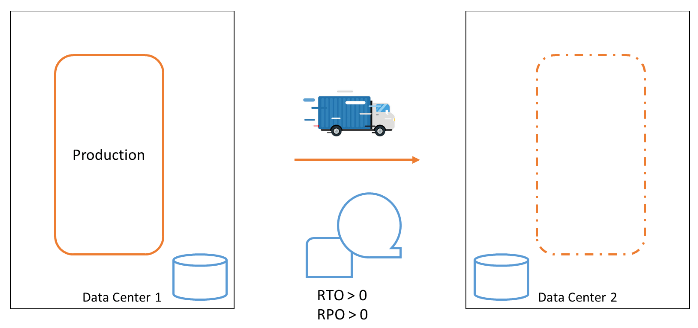
At some point, the risk of data loss and the time required to recover our business functions in the event of a computer failure became too high. We needed to respond to computer failures faster. A second data center was built, and a second computer was installed in it. We backed up our data on tape and shipped a copy of the tapes to the other data center, allowing us to recover from the failure of an entire data center.
We still had to make backups at regular intervals that we could fall back to, leaving the RPO still significantly high. But we had better tolerance against equipment failures and even entire data center failures.
Our recovery procedures became more complex. It was always a challenge to ensure our systems would be recoverable in the secondary data center. The loss of data could not be prevented. The time it took to get the systems back up in the new data center was significant.
Clustering systems with Parallel Sysplex
In the 1990s, IBM developed a clever mechanism that creates a cluster of two or more MVS (z/OS) operating system images. This included advanced facilities for middleware solutions to leverage such a cluster and build middleware clusters with unparalleled availability. Such a cluster is called a Parallel Sysplex. The members—the operating system instances—of a Parallel Sysplex can be up to 20 kilometers apart. With these facilities, you can create a Parallel Sysplex that spans two (or more) physical data centers. Data is replicated synchronously between the data centers, ensuring that any change to the data on the disk in one data center is also reflected on the disk in the secondary data center.
The strength of the Parallel Sysplex is that when one member of the Parallel Sysplex fails, the cluster continues operating, and the user does not notice. An entire data center could be lost, and the cluster member(s) in the surviving data center(s) can continue to function.
With Parallel Sysplex facilities, a configuration can be created that ensures no disruption occurs when a component or data center fails, resulting in a Recovery Time Objective (RTO) of 0. This allows operation to continue without any loss of data, with a Recovery Point Objective (RPO) of 0.
Continuous availability with GDPS
In addition to the Parallel Sysplex, IBM developed GDPS. If you lose a data center, you eventually want the original Parallel Sysplex cluster to be fully recovered. For that, you would need to create numerous procedures. GDPS automates the task of failover for members in a sysplex and the recovery of these members in another data center. GDPS can act independently in failure situations and initiate recovery actions.
Thus, GDPS enhances the fault tolerance of the Parallel Sysplex and eliminates many tasks that engineers would otherwise have to execute manually in emergency situations.
Valhalla reached?
With GDPS, the mainframe configuration has reached a setup that could genuinely be called continuously available. So is this a resilience walhalla?
Unfortunately not.
The GDPS configuration also has its challenges and limitations.
Performance
The first challenge is performance. In the cluster setup, we want every change to be guaranteed to be made in both data centers. At any point in time, one entire data center could collapse, and still, we want to ensure that we have not lost any data. Every update that must be persisted must be guaranteed to be persisted on both sides. To achieve this, an I/O operation must not only be performed locally in the data center’s storage, but also in the secondary data center. Committed data can therefore only be guaranteed to be committed if the storage in the secondary data center has acknowledged to the first data center that an update has been written to disk.
To achieve this protocol, which we call synchronous data mirroring, a signal with the update must be sent to the secondary data center, and a confirmation message must be sent back to the primary data center.
Every update requires a round-trip, so the minimum theoretical latency due to distance alone is approximately 0.07 milliseconds—that is, the speed of light traveling 10 kilometers and back. In practice, actual update time will be higher due to network equipment latency, such as in switches and routers, protocol overhead, and disk write times. For a distance of 10 kilometers, an update could take between 1 and 2 milliseconds. This means for one specific application resource, you can only make 1000 to 500 updates per second. (Many resource managers, like database management systems, fortunately, provide a lot of parallelization in their updates.)
In other words, a Parallel Sysplex cluster offers significant advantages, but it also presents challenges in terms of performance. These challenges can be overcome, but additional attention is necessary to ensure optimal application performance, which comes at the cost of increased computing capacity required to maintain this performance.
Cyber threats
Another challenge has grown in our IT context nowadays: threats from malicious attackers. We have connected our IT systems to the Internet to allow our software systems to interact with our customers and partners. Unfortunately, this has also created an attack surface for individuals with malicious intent. Several types of cyberattacks have become a reality today, and cyber threats have infiltrated the realms of politics and warfare. Any organization today must analyse its cyber threat posture and defend against threats.
One of the worst nightmares is a ransomware attack, in which a hostile party has stolen or encrypted your organization’s data and will only return control after you have paid a sum of money or met their other demands.
The rock-bottom protection against ransomware attacks is to save your data in a secure location where attackers cannot access or manipulate it.
Enter Cybervault
A Cybervault is a solution that sits on top of your existing data storage infrastructure and backups. In a Cybervault, you store your data in a way that prevents physical manipulation: you create an immutable backup of your data.
In our mainframe setup, IBM has created a solution for this: IBM Z Cyber Vault. With IBM Z Cybervault, we add a third leg to our data mirroring setup, an asynchronous mirror. From this third copy of our data, we can create immutable copies. This solution combines IBM software and storage hardware. With IBM Z Cyber Vault, we can make a copy of all our data at regular intervals as needed. Typically, we can make an immutable copy every half hour or every hour. Some IBM Z users take a copy just once every day. This frequency can be configured. From every immutable copy, we can recover our entire system.
So now we have a highly available configuration, with a cyber vault that allows us to go back in time. Great. However, we still have more wishes on our list.
Application forward recovery
In the great configuration we have just built, we can revert to a previous state if data corruption is detected. When the corruption is detected at time Tx, we can restore our copy from time T0, the backup closest to the moment T1 of data corruption.
Data between the corruption at T1 and the detection at Tx is lost. But could we recover as much of the data that was still intact after the backup was made (T0) and before the corruption occurred (T1)?
Technically, it is possible to recover data in the database management system Db2 using the image copies and transaction logs that Db2 uses. With Db2 recovery tools, you can recover an image copy of a database and apply all changes from that backup point forward, using the transaction logs in which Db2 records all changes it makes. When we combine this technology with the Cybervault solution, we would need a few more facilities:
A facility to store Db2 image copies and transaction logs. Immutable, of course.
A facility to let Db2, when restored from some immutable copy, know that there are transaction logs and archive logs made in the future, to which it can perform a forward recovery.
That is work, but it is very feasible.
Now, we have reached a point where we have created a highly available configuration, with a cybervault that can recover from a point as close to the point of corruption as possible.
Adding Linux workloads
Most of today’s mainframe users run Linux workloads on the mainframe, besides the traditional z/OS workloads. These workloads are often as business-critical as the z/OS workload. Therefore, it is great that we can now also include Linux workloads, including OpenShift container-based workloads, in the superb resilience capabilities of IBM Z.
Challenges
As such, we have extended the best-in-class resilient platform. Unfortunately, we are pushed further to address today’s challenges.
What if your backup is too close to your primary data?
Data Centers 1 and 2, as discussed above, may be too close to each other. This is the case when a disaster can occur that affects operations in both data centers. These could include natural disasters, such as a power outage or a plane crash.
I have called them Data Centers so far. Yet, the more generic term in the industry is Availability Zones. An Availability Zone is a (part of) Data Center that has independent power, cooling, and security, just like a Data Center. When you spread your IT landscape over availability zones, or data centers across geographical distances, you put them in different Regions. Regions are geographic areas, often with different risk profiles for disasters.
The Data Centers, or Availability Zones, are relatively close together, especially in European organizations. They are in the same Region. With the recent changes in political and natural climate, large organizations are increasingly looking to address the risks in their IT landscape and add data center facilities in another Region.
Cross-region failover and its challenges
To cater to a cross-region failover, we need to change the data center setup. With our GDPS technology, we can cater for this by adding a GDPS Global ‘leg’ to our GDPS setup. The underlying data replication is Global Mirror replication, asynchronous.
The setup in this last picture summarizes the state of the art of the basic infrastructure capabilities of the mainframe. In comparison to other computing platforms, including cloud, the IBM Z infrastructure technologies highlighted here provide a comprehensive resilience solution for all workloads on the platform. This simplifies the realization and management of the resilience solution.
More challenges
Yet, there remains enough to be decided and designed, such as:
Are we going to set up a complete active-active configuration in Region B, or do we settle for a stripped-down configuration? Our business will need to decide whether to plan for a scenario in which our data center in Region A is destroyed and we cannot switch back.
Where do we put our Cybervault? In one region, or in both?
How do we cater for the service unavailability during a region switch-over? In our neat, active-active setup, we can switch between data centers without any disruption. This is not possible with a cross-region failover. Should we design a stand-in function for our most business-critical services?
We could lose data between our regions. The data synchronization is asynchronous. How should we cater for this potential data loss?
When tackling questions about risk, it all begins with understanding the organization’s risk appetite: the level of risk the business is willing to accept as it works toward its objectives. Leadership teams must decide which risks are best handled through technical solutions. For organizations operating in regulated spaces, regulators set minimum standards.
The bottom line on mainframe resilience
No other computing platform offers the combination of capabilities described in this article: zero RTO/RPO clustering, automated failover, immutable cyber vaults, forward recovery, and cross-region replication, all integrated into a single platform.
The remaining questions are not technical. They are strategic: How much resilience does your organization need? What is your risk appetite? And how does your mainframe resilience strategy connect to your broader IT and cloud strategy?
These are exactly the kinds of decisions explored in my book Don’t Be Afraid of the Mainframe. Chapter 12 covers system management and availability in depth, while the strategic decision frameworks in Part 3 help you translate technical capabilities into business choices.
I often realize I’m doing repetitive tasks that could easily be automated. Money transfers, reminders, invoices-these are simple, low-effort activities that don’t deserve to consume my time. Every time this happens, I tell myself, “I should automate this to save time and mental effort.” And yet, somehow, I don’t. I tell myself I have no time to automate.
Automation frees up time
In IT, especially when automating mainframe processes, we encounter the same hesitation:
“We don’t need to automate this; once it’s done, we’ll never do it again.”
Which almost never turns out to be true.
Repetitive tasks-whether personal or IT-related-are often simple to automate but remain manual due to perceived time constraints.
In IT, automation is critical. It reduces manual errors, improves consistency, and frees up time for more strategic work.
A Shift in Mindset
Automation requires a different engineering mindset. Instead of the familiar cycle:
Do → Fix → Fix → Fix
We move to:
Engineer process → Run process / Fix process → Run process → Run process
Once engineered, automated processes run with minimal intervention, saving both time and effort.
When to Automate
If you find yourself performing a task more than twice, consider automating it. Whether through shell scripting, JCL, utilities, or tools like Ansible, automation quickly pays off.
Automation is not optional-it’s essential for efficient IT operations and professional growth. Start automating today to work smarter, not harder.
Don’t waste time doing things more than twice. If you do something for the third time, automate it-you’ll likely have to do it a fourth or fifth time as well.
The interviewers, Herbert Blankesteijn and Ben van der Burg, were surprised to find that COBOL is not bad and is very good for programming administrative automation processes. Legacy is not an issue. Not allowing time for maintenance is a management issue. He mentioned the Lindy effect which tells us that the life expectancy of old code increases with time. The established code is anti-fragile.
Anyone in the product chain can pull the Andon Cord to stop production when he notices that the product’s quality is poor.
Stopping a system when a defect is suspected originates back to Toyota. The idea is that by blocking the system, you get an immediate opportunity for improvement or find a root cause instead of letting the defect move further down the line and be unresolved.
A crucial aspect of Toyota’s “Andon Cord” process was that when the team leader arrived at the workstation, they thanked the team member who pulled the Cord.
The incident would not be a paper report or a long-tail bureaucratic process. The problem would be immediately addressed, and the team member who pulled the cord would fix it.
For software systems, this practice is beneficial as well. However, the opposite process is likely the practice we see in our drive for quick results.
We don’t stop the process in case of issues. We apply a quick fix, and ‘we will resolve it later’.
The person noticing an issue is regarded as a whistle-blower. Issues may get covered in this culture, leading to even more severe problems.
When serious issues occur, we start a bureaucratic process that quickly becomes political, resulting in watered-down solutions and covering up the fundamental problems.
In software systems, backward compatibility is a blessing and a curse. While backward compatibility discharges users from mandatory software updates, it is also an excuse to ignore maintenance. For software vendors, omitting backward compatibility is a means to get users to buy new stuff; “enjoy our latest innovations!”.
1980s software on 64-bit hardware
DS Backward compatibility
You can not run Windows 95 software on Windows 11.
You can not Run MacOS X software on a PowerBook G4 from 2006.
You can not use Java version 5 software on a Java 11 runtime.
You can, however, run mainframe software compiled in 1980 for 16-bit hardware on the latest z/OS 64-bit operating system and the latest IBM Z hardware. This compatibility is one of the reasons for the success of the IBM mainframe.
Backward compatibility in software has significant benefits. The most significant benefit is that you do not need to change applications with technology upgrades. This saves large amounts of effort and, thus, money for changes that bring no business benefit.
The dangers of backward compatibility
Backward compatibility also has very significant drawbacks:
Because you do not need to fix software for technology upgrades, backward compatibility leads to laziness in maintenance. Just because it keeps running, the whole existence of the software is lost out of sight. Development teams lose the knowledge of the functionality and sometimes even the supporting business processes. Minor changes may be made haphazardly, leading to slowly increasing code complexity. Horrific additions are made to applications, using tools like screen scraping, leading to further complexity of the IT landscape. Then, significant changes are suddenly necessary, and you are in big trouble.
Backward compatibility hinders innovation. Not only can you not take advantage of modern hardware capabilities, but you also get stuck with programming and interfacing paradigms of the past. You can not exploit functionality trapped inside old programs, and it is tough to integrate through modern technologies like REST APIs.
The problem may be even more significant. Because you do not touch your code, other issues may appear.
Over the years, you will change from source code management tools. During these transitions, code can get lost, or insight into the correct versions of programs gets lost.
Also, compilers are upgraded all the time. And the specifications of the programming languages may change. Consequently, the code you have, which belongs to the programs running in your production environment, can not be compiled any longer. When changes are necessary, your code suddenly needs to catch up with all these changes. And that will make the change a lot riskier.
How to avoid backward compatibility complacency?
Establish a policy to recompile, test, and deploy programs every 2 or 3 years, even if the code needs no functional change. Prevent a pile of technical debt.
Is that a lot of work? It does not need to be. You could automate most, if not all, of the compilation and testing process. If nothing functionally changes, modern test tools can help support this process. With these tools, you can automate running tests, compare results with the expected output, and pinpoint issues.
This process also has a benefit: your recompiled code will run faster because it can use the latest hardware features. You can save money if your software bill is based on CPU consumption.
Don’t let backward compatibility make you backward.
My proverbial neighbor asked me some time ago if he could have a zero data loss ransomware recovery solution for his IT shop. He is not a very technical guy, yet responsible for the IT in his department, and he is wise enough to go seek advice on such matters. My man next door could very well be your boss, being provoked by a salesperson from your software vendor.
What is a zero data loss ransomware recovery solution?
A ransomware recovery solution is a tool that provides you the ability to recovery your IT systems from the incident in which a ransomware criminal has encrypted a crucial part of your IT systems. A zero data loss solution promises to provide such a recovery without the loss of any data. The promise of zero data loss must be approached with the necessary skepticism. A zero data loss solution requires you to be able to decrypt the data that your ransomware criminal has encrypted with the keys that he offers to give you for a nice sum of money. To get these keys you have two options:
Pay the criminal and hope he will send you the keys.
Create the keys yourself. This would require some highly advanced algorithm, possibly using a tool based on Quantum computing technology. This is a fantasy of course. This first person to know about the practical application of such technology would be your ransomware criminal himself, and he will have applied this in his encryption tooling.
So getting the keys is not an option, unless you are in the position to save up a lot of money, or find an insurer that will carry your ransomware risk. Although I expect that will come at an excruciating premium.
The next best option is to recover your data from a point in time just before the event of the ransomware attack. This requires a significant investment in advanced backup technology, and complex recovery procedures, while giving you little guarantee as to what state your systems can be recovered. And, setting the expectations, will come with the loss of all data that your ransomware criminal managed to encrypt. We cannot make it more beautiful.